Cursive Font Generator
This free cursive font generator turns your text into flowing cursive script you can copy and paste into any bio, name, or caption. Every cursive style renders side by side, so you pick one that lands where you paste it.
Turn your text into cursive in three steps
Type, compare, copy. The cursive font generator runs in your browser, so your text never leaves your device.
- Type or paste your text: Drop it in the box at the top of the page. The tool accepts up to 5,000 characters.
- Compare every cursive style at once: It renders all the cursive variants side by side as live cards, instead of swapping a dropdown.
- Click a card to copy, then paste: Paste into your Instagram bio, Discord name, signature line, or caption. The destination's own limit (Instagram bios are 150 characters) is the real ceiling.
Why cursive pastes where fonts can't
Cursive text from this tool is not a font. It is a set of Unicode characters that look cursive on their own, which is why it lands in fields with no font or italics button.
Cursive Unicode is not a font
Each cursive letter is a separate Unicode character drawn from the Mathematical Alphanumeric Symbols block (U+1D400–U+1D7FF, added in Unicode 3.1, 2001). Script capitals start at U+1D49C (𝒜); bold script capitals start at U+1D4D0 (𝓐). The block was built for math. Unicode's own guidance says these styled characters should not replace real formatting markup, but people on social media use them for stylized names — and that is what a cursive font generator ships.
Why some capitals look different
Eight script capitals — B, E, F, H, I, L, M, R — and three lowercase letters — e, g, o — are not in the Mathematical Alphanumeric Symbols block at all. They live in the older Letterlike Symbols block (ℬ = U+212C, ℰ = U+2130, ℱ = U+2131), and the matching Mathematical-block code points are reserved. A script alphabet is stitched together from two blocks, which is why a few capitals can look slightly different or render less evenly than the rest.
Why your digits stay plain
The block has digit columns for Normal, Bold, Double-struck, Sans-serif, and Monospace, but no Script or Bold Script digit column. Type Studio 123 and you get 𝒮𝓉𝓊𝒹𝒾ℴ 123 — the letters switch to script and the digits fall through to ordinary numbers.
The nine cursive alphabets, by where their letters come from
The cursive font generator ships nine alphabets under its cursive category, and they do not all render the same way. Here is what each looks like, grouped by where its characters come from.
Mathematical Script and Bold Script — real Unicode
- Mathematical Script: the classic flowing cursive look. Drawn from the Mathematical Alphanumeric Symbols block, so it renders on most modern phones and browsers. No digit glyphs — numbers stay plain. (𝒞𝓊𝓇𝓈𝒾𝓋ℯ)
- Mathematical Bold Script: the same script shape at a heavier weight. Reads louder in a name, and covers the same devices as Script. (𝓒𝓾𝓻𝓼𝓲𝓿𝓮)
Italic variants — safe with digits
- Serif italic: a slanted printed-book cursive. Covers digits and accents, so it is the safer pick for names with numbers. (𝐶𝑢𝑟𝑠𝑖𝑣𝑒)
- Serif bold italic: italic with weight. Same digit and accent coverage as serif italic. (𝑪𝒖𝒓𝒔𝒊𝒗𝒆)
- Sans-serif italic: a clean, modern slant. Renders everywhere italics do, digits included. (𝘊𝘶𝘳𝘴𝘪𝘝𝘦)
Decorative cursive variants
- Curly: looping curls from mixed Latin and extended characters. Best for short nicknames; can show as boxes on older devices or under-resourced apps. (ƈųཞʂıѵɛ)
- Kawaii: a softer, rounded script with a whimsical feel. Fun for handles, same tofu risk on older devices. (Cυяsινε)
- Squiggle: a wavy, brush-stroke take on cursive. Playful for a display name, least reliable on old hardware. (ςยгรเשє)
- Strokes: thin, upright IPA-style marks — a minimal, technical look rather than flowing script. Same tofu risk on older devices. (ƈʊʀꜱɨʋɛ)
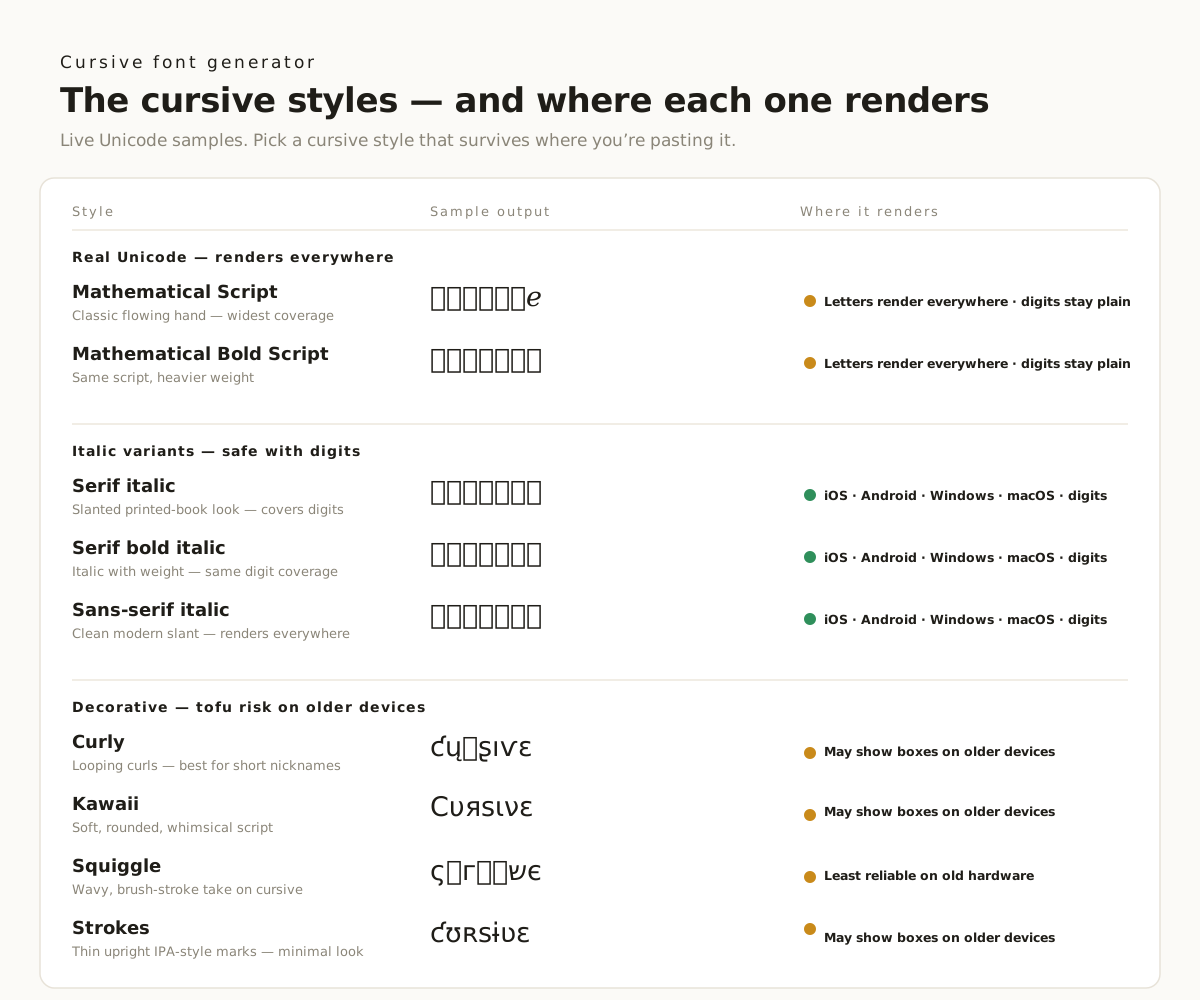
That is nine alphabets under the cursive label alone. For gothic, aesthetic, or dozens of other looks, open the full font generator.
Where cursive text reads best
Cursive script earns its keep on plain-text surfaces that have no font or italics button. These are the places it lands best.
- Instagram bios and captions: Instagram has no font picker in bios, captions, comments, or DMs. Cursive Unicode is how you get a flowing-script look in a bio.
- Discord nicknames and roles: Discord names accept Unicode. A cursive nickname reads softer and more distinctive in a member list.
- TikTok and YouTube captions: Lead a caption with a cursive word or two so the hook reads as styled text before the feed cuts it off.
- Free Fire, PUBG, and Roblox names: In-game names are plain-text fields. A cursive style gives a gamer tag a flowing, signature feel in lobbies and leaderboards.
- Facebook posts and comments: Facebook has no font button in posts or comments. Paste cursive characters to style a headline.
- Reddit and X (Twitter) display names: Display names accept Unicode. A short cursive name stands out in a thread or timeline.
- Signatures, invitations, and tattoo lettering: Cursive suits these better than any other style. Use it to preview a signature line, mock up an invitation, or sketch tattoo lettering before you commit to ink.
- Wi-Fi names and browser tabs: Plain-text labels with no formatting. A cursive label is easier to pick out of a list.
Most platforms cap how much fits. Instagram bios top out at Instagram's 150-character bio limit, and cursive characters are multi-byte, so they eat into that budget faster than plain ASCII. Check your length before you paste.
Why this cursive generator is different
Most cursive text generators hand you one style behind a dropdown. This page lays every cursive variant out side by side, and flags which one actually arrives where you paste it.
Free, with no signup or watermark:
no account, no ads, no watermark on the output. Load the page, type, copy.
Private by design:
the tool runs entirely in your browser. Your text is never uploaded, stored, or sent to a server.
All cursive styles at once:
other cursive text generators render one style at a time behind a dropdown. This page shows every variant side by side so you compare before you copy.
Forty-nine style categories, 5,000-character input:
cursive is one of forty-nine categories, and the input box takes up to 5,000 characters.
Pick the cursive style that fits your field
Four calls that cover almost every name, bio, or caption.
Need it to render everywhere? Pick Mathematical Script: it is real Unicode with the widest device and app coverage of any cursive style here.
Want a signature feel? Use Script: the lighter flowing hand reads like an ink signature — a good fit for a cursive signature font copy and paste.
Want a name that pops? Use Bold Script: the heavier weight stands out in a Discord name or game tag, and lands the bold cursive look.
Mixing letters and digits? Avoid Script and Bold Script: those alphabets have no number glyphs, so digits fall through to plain. Pick an italic variant if numbers must render, and keep decorative styles off older devices where they can tofu.
Cursive text in real bios and names
Real cursive font output — shown as it appears where you paste it. Every sample below is the exact Unicode the tool produces.
𝓛𝓸𝓿𝓮
Instagram bio handle
𝒞𝓊𝓇𝓈𝒾𝓋ℯ
Discord nickname
𝒮𝒾ℊ𝓃𝒶𝓉𝓊𝓇ℯ
Signature line
𝒮𝓉𝓊𝒹𝒾ℴ 123
Game tag (digits stay plain)
Cursive looking off? Three likely causes
Three issues behind almost every question about cursive Unicode.
My cursive text shows up as empty boxes (tofu)
The device lacks full coverage for the Mathematical Alphanumeric Symbols and Letterlike Symbols blocks. This shows up most with script capitals on older Windows or under-resourced apps, and with decorative styles on older phones. Fall back to Mathematical Script or an italic variant. On your own site, use real italic (<em>) or a web font.
My numbers did not turn cursive
Script and Bold Script have no digit glyphs by design. Your digits fall through to ordinary numbers, so Studio 123 becomes 𝒮𝓉𝓊𝒹𝒾ℴ 123. Use an italic variant if the digits must render in style.
My cursive text pastes in but looks normal
The destination field rejects special characters, so the glyphs fall back to plain text. Some games and apps filter non-ASCII input this way. Switch to an italic style, or paste into a field that accepts Unicode.
Cursive text, explained
How do I make my font cursive?
Type your text in the box at the top of this page. The cursive font generator renders every cursive style as a live card. Click a card to copy it, then paste it into your bio, name, or caption.
What is a cool cursive font I can copy?
It depends on the look. Mathematical Script (𝒞𝓊𝓇𝓈𝒾𝓋ℯ) is the classic flowing hand. Mathematical Bold Script (𝓒𝓾𝓻𝓼𝓲𝓿𝓮) is the same shape at a heavier weight. Curly and squiggle are more playful but render less reliably on older devices.
Is there a free cursive font creator?
Yes. This cursive font generator is free, needs no account, and adds no watermark. It runs in your browser, so your text never leaves your device.
Is there an app that turns text into cursive writing?
You do not need an app. This tool runs in any modern browser on phone or desktop. Type your text, pick a cursive card, and paste — no install required.
What cursive font does Instagram use?
Instagram does not use a single cursive font. Bios render in Instagram's system font, with no font picker. The cursive look you see in bios is Unicode script characters (𝒞𝓊𝓇𝓈𝒾𝓋ℯ) pasted in as text, not a font Instagram applies.
How do I change the handwriting style in my Instagram bio?
Instagram has no handwriting or font setting. Generate a cursive style here, copy it, and paste it into your bio field. The script characters travel as text, so Instagram shows them as cursive.
Is cursive text really a font?
No. The output is a set of Unicode characters from the Mathematical Alphanumeric Symbols block, not a font file. That is why it pastes into places with no font button — bios, DMs, game names. On your own website, use a real web font or HTML italic (<em>) instead.
Why do the numbers in my cursive text stay plain?
The Mathematical Alphanumeric Symbols block has no Script or Bold Script digit column. Letters switch to script and digits fall through to ordinary numbers: Studio 123 becomes 𝒮𝓉𝓊𝒹𝒾ℴ 123. Pick an italic variant if the numbers must render in style too.